- Softonic Rating:
- Good:7/10
- License:
- Free
- Added:
- April 11, 2007
- Updated:
- June 4, 2008
- Publisher:
- Website
- File size:
- 2.2 MB
- Downloads:
- 169
- DownloadFree
“Organize your phrases with this clipboard manager”
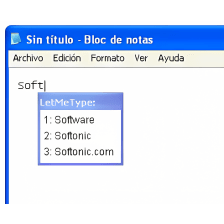
You can increase your productivity by allowing PhraseExpress to complete the sentences you want to write. How? The program simply keeps a record of the sentences you write, and when it detects something you have already written, it suggests it in tag form. You can then accept it by pressing the Tab button.
Nothing could be easier as the program does the whole job automatically. Sentences like, ‘I look forward to hearing from you soon’ or ‘thank you for your kind email’ or then again, ‘how could you do that? I cannot trust you, as usual’, will be quickly available as soon as you write the first two words. The program also works with abbreviations, which you can set in the manager. It even corrects typos that may reoccur with a certain frequency in your writing. I like the fact that it’s fast and that you can accept the suggestions with the Tab key or ignore them simply by continuing writing.
As we still haven’t achieved a very high level of artificial intelligence, even in high-tech laboratories, you can’t expect this application to guess what you would like to say. It is just suitable for standard sentences that are usually used in commercial style letters. Nevertheless, you might be surprised how often, even in personal letters we repeat certain sentences, and that’s where PhraseExpress will speed up your work.
Although PhraseExpress can’t really write for you, the application can suggest sentences if it detects from the first two words something you have already written. Therefore, it can speed up processes in office work and whenever you need to keep style consistent.
Languages:
English, German
Recent changes in PhraseExpress:
- Improved TerminalServer Support: PhraseExpress now uses the user's host PC name plus a trailing "_TS" tag for the computer identification in the Client Manager monitor (rather than the TerminalServer's computer name). This allows using PhraseExpress simultaneously within the TerminalSession and on its host PC.
- Minor bugfixes
OS requirements for PhraseExpress:
- OS: Win2000/XP/2003/Vista
- Works automatically in background
- Suggests sentences in tag you can ignore or accept with the Tab key
- There’s no intelligent tool to suggest you alternative ways to say something
From the publisher of PhraseExpress
PhraseExpress organizes your frequently used phrases and allows pasting them into any application. The auto complete feature automatically expand abbreviations and correct typos while you type.
Do you find yourself typing common phrases over and over again? Just store abbreviations, answers to frequently asked questions, email templates or forum postings in PhraseExpress and reuse them again and again. PhraseExpress eliminates repetitive typing and is the ideal solution for office workers, tech support staff, pre sales, editors, writers and developers.
PhraseExpress not only improves your productivity but also minimizes typing errors. Less typing - Less typos! The AutoCorrect feature additionally corrects misspellings while you type in any program. This works for all common misspellings you have defined.
There are many typing automation tools out there, but none of them beat PhraseExpress in its ease of use. Selecting a text phrase for insertion just takes a single mouse click. Adding a new phrase is done in less than 5 seconds.
PhraseExpress enables all employees to use the same letter templates and common terminology for the customer communication. This helps large scale organizaitons to maintain a consistent corporate identity.
PhraseExpress provides the AutoCorrect function as known from MS Office but for all applications on your computer. AutoText expands short keywords into full phrases. Example: typing 'btw' would be automatically expanded to 'by the way' while you type. You can also quickly trigger phrases by using hotkeys. The phrase selection opens directly next to your mouse cursor.
The current date/time stamp or incrementing variables for order numbers or support tickets can be added at any position. The comprehensive macro language allows automating repetitive tasks on your computer such as logging in to a website. The separate PhraseExpress Network Server (coming soon) distributes phrases to all clients in a network. The server can store all client settings and manages the central phrase file read/write access rights.
Sponsored Links
Programs similar to PhraseExpress
PhraseExpress options
Reviews for PhraseExpress in other languages
- PhraseExpress (Testbericht auf Deutsch)
- PhraseExpress (Análisis en español)
User Rating
1 rating- Usability
-
- Currently 10/10.
- Stability
-
- Currently 10/10.
- Installation
-
- Currently 10/10.
- Functionality
-
- Currently 10/10.
- Appearance
-
- Currently 10/10.
You need to be registered and logged in Softonic to participate in the promotion.
Congratulations!
- badminton
You obtained a new logo for your team.
You already found this logo. Find more logos now!
Your team mate was faster than you this time. Try again tomorrow!